


Fansoso
Like.tg
CommunityOnline ServiceOfficial ChannelFraud CheckCurrency Tool
Anybox
product
This product service is provided by third-party merchants. Please identify the service quality to avoid being deceived.

Anybox

(0 reviews)
Disclaimer
Applicable Scope
Product Information
User Reviews
Related Products
Disclaimer
This product is listed by LIKETG on behalf of third-party merchants. Products/services/after-sales are all provided by third-party merchants, not official LIKETG products. All activities, benefits, and restrictions are unrelated to LIKETG official. Please identify carefully.

Applicable Scope

Anybox 是MacOS和iOS的现代书签经理,这是一种基本的生产力工具。

Product Information

What is Anybox?

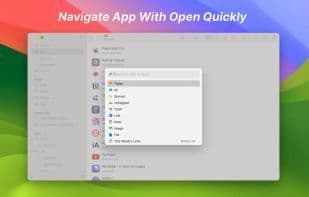
Anybox 是MacOS和iOS的现代书签经理,这是一种基本的生产力工具。 除了自动获取链接标题和站点图标外,Anybox 还可以从支持打开图的站点中获取预览图像和描述。您还可以更改所有链接元数据。 您可以使用复制和贴花,拖放,Apple脚本,MACOS服务,共享菜单,键盘快捷键,URL方案等保存链接。Anybox 还支持保存笔记,图像和文件。您可以在Anybox 中保存一些经常使用的摘要,例如ID号或电子邮件地址,然后将其直接从Mac应用程序中直接粘贴到“快速查找”中,或在iOS应用中使用TAP复制它。 当您不在应用外面时,您可以激活“快速查找”,一种类似于聚光灯的接口,并带有全局键盘快捷键或修饰符键来搜索和打开链接。Anybox 还支持智能列表,该功能使您可以自动按属性(例如添加日期或域名)对链接进行分类。Anybox 是MacOS和iOS的现代书签经理。它利用本地技术为用户提供节省链接和打开链接的最简单方法。这是您日常工作流程的重要生产力工具。

How to use Anybox?

Anybox 是一款适用于 macOS 和 iOS 的现代化书签管理器,旨在帮助用户轻松保存、管理和打开网页链接、笔记、图片和文件,提升日常工作效率。

Anybox Core Functions of

原生应用

Anybox Usage Scenarios of

  • 通过复制粘贴、拖放、共享菜单等多种方式快速保存网页链接。
  • 保存常用文本片段(如身份证号、电子邮件地址),并通过“快速查找”功能快速粘贴。
  • 使用全局快捷键激活“快速查找”界面,快速搜索并打开已保存的链接。
  • 利用智能列表功能,根据添加日期或域名等属性自动分类整理链接。
  • 将重要网页存档为 PDF、Web Archive 或截图,以防丢失。
  • 使用小组件追踪阅读列表或快速保存剪贴板内容。

Anybox Common Questions about

Anybox做什么的?
我如何使用Anybox?
Anybox有哪些核心功能?
Anybox有哪些应用场景?

User Reviews

No reviews yet, come and publish your review
5 out of 5
Would you recommend Anybox ? Publish your review

Disclaimer

This product is listed by LIKETG on behalf of third-party merchants. Products/services/after-sales are all provided by third-party merchants, not official LIKETG products. All activities, benefits, and restrictions are unrelated to LIKETG official. Please identify carefully.












