




Product Information
What is Ailight?
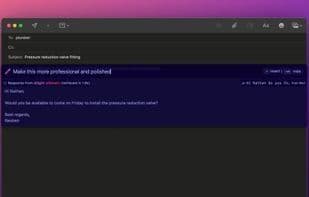
Highlight and transform anything on screen—without disrupting your flow or leaving the current app.
Use it everywhere on macOS and Windows. Craft custom actions for your workflow.
Create Custom Actions: Build AI-powered actions to accelerate your unique workflows while maintaining momentum.
Backup and sync operations seamlessly across all Windows and macOS computers with ailight Ultimate.
Why ailight?
Everywhere: Convert text and screenshots to tackle tasks across your work—emails, spreadsheets, presentations, documents, note-taking apps, browsers, code editors, or any other tool in your workflow.
Custom Actions: Create and define your own actions to precisely meet your text transformation needs. Save them with a click and reuse them, building your personal library of AI-driven tools.
Stay Focused: No more context-switching between different places or copying text into chatbots. Bring AI into your work, not the other way around.
How to use Ailight?
Ailight is a tool designed for macOS and Windows that enables users to highlight and convert any on-screen content without leaving their current application. It streamlines workflows with customizable AI actions, helping maintain focus and minimize context switching.
Core Functions of Ailight
Ad-Free
Optical character recognition
No Registration Required
Screenshot OCR
AI-Driven
AI writing
Text recognition
Screenshot text recognition
Usage Scenarios of Ailight
- Convert text in emails.
- Process data in spreadsheets.
- Optimize content in presentations.
- Transform text in documents and note-taking apps.
- Apply AI actions in browsers and code editors.
Common Questions about Ailight
What does Ailight do?
How do I use Ailight?
What are the core features of Ailight?
What are the use cases for Ailight?



















