



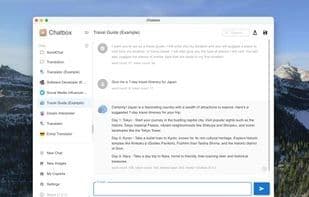

Product Information
What is Chatbox ai?
Unlock the power of AI at your fingertips with Chatbox, the all-in-one app seamlessly integrated across all major platforms—Windows, Mac, Linux, Web, and iOS.
Diverse AI at Your Command
Chatbox introduces you to a world of possibilities by supporting a range of advanced LLMs (Large Language Models), including:
- GPT-3.5 and GPT-4
- Claude 3 and Claude 2
- Google Gemini Pro
- …and other popular models
More Than Just Words
Chatbox goes beyond text with exciting features:
- **AI Vision** – Unlock insights and explore the world through an AI lens.
- **AI Drawing** – Let your imagination take shape with AI-assisted creativity.
Productivity, Reimagined
Designed with efficiency in mind, Chatbox is the go-to AI tool for revolutionizing your work and study routines. Its intuitive interface ensures you spend less time learning and more time doing.
How to use Chatbox ai?
Chatbox AI is a versatile AI client and smart assistant supporting GPT, Claude, Gemini, and other LLMs with cross-platform integration. It boosts productivity with AI vision, drawing, document interaction, code generation, and web search while ensuring data privacy.
Core Functions of Chatbox ai
No Registration Required
Dark Mode
Ad-Free
No Tracking
AI writing
AI-Driven
No Sign-Up, Dark Mode, No Ads, No Tracking, AI Writing, AI-Powered
Usage Scenarios of Chatbox ai
- Explore the world and gain insights with AI vision capabilities.
- Transform ideas into visual works with AI drawing and image generation.
- Interact with documents, images, and code to get intelligent responses.
- Use AI assistance for code generation, review, and debugging.
- Obtain real-time information and news through AI-powered web searches.
- Visualize complex concepts and data with AI-generated charts.
Common Questions about Chatbox ai
What does Chatbox AI do?
How do I use Chatbox AI?
What are the core features of Chatbox AI?
What are the applications of Chatbox AI?



















