




Product Information
What is Clipbeam?
Clipbeam boosts and automatically organizes all your notes, links, and files—for free (without spying on you).
Transform your digital life with instant recall and smart analysis that works across all your content—completely private and offline. No accounts, no trackers, no corporate data mining. Your information stays yours alone.
**One Cozy Home for Everything**
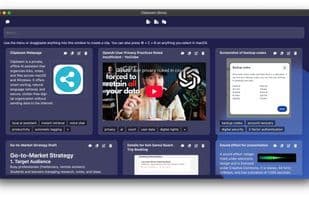
Links, documents, screenshots, voice memos… everything lands in a tidy, searchable library. No more "Did I save that?" moments. Clipbeam knows it all. It reads office docs, listens to podcasts/voice memos, and even describes what’s in images.
**Smart Sorting & Retrieval**
Clipbeam summarizes and auto-tags everything. Then, it pulls up anything you need just by asking. A simple sentence like, "Show me the creamy dessert recipes I saved," and you’ll be indulging in that cheat day in seconds.
**Built for Privacy**
If the first section made you nervous, guess what? Your clips never leave your computer. The AI runs entirely offline—if you’re extra cautious, you can even disable anonymous usage stats. Turn off WiFi and go off-grid? It still works like a boss.
**Your New Best Friend (That Actually Listens)**
Dictate notes hands-free, record meetings, or just chat—Clipbeam listens and responds naturally, in text or voice. Ask for key points from a meeting and get answers instantly, even if you didn’t jot anything down. Everything you say and hear is effortlessly captured.
**Integrated with macOS & Windows**
Press ?/Ctrl + C + B anywhere, and instantly clip your selection. Need to paste it into any app later? Smooth as butter.
**Clutter-Free Design**
Minimalist color-coded cards let you grasp each clip at a glance. No more digging through endless browser tabs.
How to use Clipbeam?
Clipbeam is a tool that automatically organizes and analyzes digital content, centralizing users' notes, links, and files while offering instant search and intelligent analysis, ensuring complete data privacy and offline operation.
Core Functions of Clipbeam
No Registration Required
Ad-Free
Dark Mode
No tracking
Available Offline
File manager
Usage Scenarios of Clipbeam
- Store links, documents, screenshots, and voice memos in a searchable vault.
- Quickly retrieve specific information with simple queries (e.g., 'Show me my saved dessert recipes').
- Hands-free dictation of notes or meeting recordings with key takeaways.
- Instantly clip selected content with shortcuts ⌘/ctrl + c + b on macOS and Windows.
Common Questions about Clipbeam
What does Clipbeam do?
How do I use Clipbeam?
What are the core features of Clipbeam?
What are the use cases for Clipbeam?



















