




Product Information
What is Commander gpt?
The Fastest and Easiest Way to Use GPT on Mac
Enhance your AI experience with Commander GPT. Unlock unparalleled efficiency and productivity through a simple yet powerful command interface, allowing you to instantly access ChatGPT without leaving your keyboard.
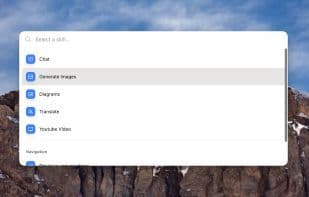
**Chat:** Access ChatGPT with a simple command, right from any application you're using.
**Generate Images:** Create images with a click using OpenAI's DALL-E model.
**Translate:** Select a language and let GPT translate any text you choose.
**YouTube Videos:** Provide a YouTube video URL, and Commander will answer any questions based on the transcript.
**Better Workflow**
Commander GPT opens in front of all other windows, so you can use it while working without disrupting your flow.
**Access with a Single Command:** Press `Command + Shift + G` to open Commander GPT. Then, type your command and hit Enter.
**View Your History:** Commander GPT keeps a local history of all your sessions.
**Customize Your Assistant:** Personalize GPT with custom system prompts and adjust how it responds.
How to use Commander gpt?
Commander GPT is an AI tool for Mac that provides a quick and easy way to use GPT, offering a concise and powerful command interface for instant access to ChatGPT without leaving the keyboard, thereby improving efficiency and productivity.
Core Functions of Commander gpt
AI-Driven
Usage Scenarios of Commander gpt
- Access ChatGPT with simple commands over any application.
- Generate images instantly with OpenAI's DALL-E model.
- Select a language and translate selected text using GPT.
- Provide a YouTube video URL to answer any question based on the video transcript.
- Quickly open and use with the shortcut Command+Shift+G.
- Use while working without interrupting your current workflow.
Common Questions about Commander gpt
What does Commander GPT do?
How do I use Commander GPT?
What are the core features of Commander GPT?
What are the use cases for Commander GPT?



















