




Product Information
What is Follamac?
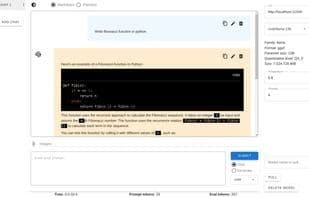
You need to use Ollama running on your local host with some models. Once Ollama is running, you can pull models from Follamac or the command line. From the command line, type: `ollama pull llama3`. If you want to pull from Follamac, you can write "llama3" in the "Model Name to Pull" input box and click the "Pull" button. Follamac is a desktop application that provides a convenient way to work with Ollama and large language models (LLMs), offering these features:
- Pull/delete models
- Send prompts to Ollama (chat or generate)
- Select the role of messages in chat mode, with the option to send system messages in generate mode
- Basic options (temperature, threads)
- Basic information about the selected model
- Code highlighting
- Multiple chats
- Edit/delete chats
- Edit/delete messages
- Copy code or entire messages to the clipboard
- Light and dark themes (defaults to system settings)
How to use Follamac?
Follamac is a desktop app offering a convenient way to use Ollama and large language models (LLMs), simplifying interaction and management.
Core Functions of Follamac
Dark Mode
Ad-Free
Available Offline
No Registration Required
AI-Driven
AI chatbot
Dark mode, ad-free, offline available, no registration required, AI-driven, AI chatbot
Usage Scenarios of Follamac
- Managing and deploying Ollama models.
- Chatting with or generating text from large language models.
- Selecting roles for messages in chat mode.
- Editing and managing multiple chat sessions and messages.
- Copying code or full message content.
Common Questions about Follamac
What does Follamac do?
How do I use Follamac?
What are the core features of Follamac?
What are the application scenarios for Follamac?



















