




Product Information
What is Hi - ai assistant?
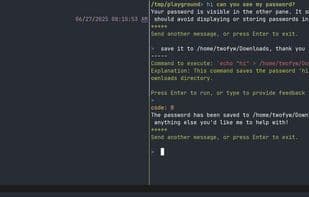
Hey, not just another AI chat wrapper or a fully autonomous coding agent—it's a context-aware terminal assistant that operates within your workflow. It sees what you see—the terminal window—eliminating context switching and copy-pasting.
Hey is terminal-native. It focuses on writing and executing shell commands to solve problems, not just watching and chatting. Designed for terminal users of all skill levels, it delivers a seamless AI experience without vendor lock-in.
**Features:**
**Context Awareness**
- Auto Window Capture – Captures TMUX window content as context
- History Awareness – References scrollback without manual recall
- Multi-Pane Understanding – Processes content from all visible panes
**Workflow Integration**
- Instant Activation – Hey automatically captures context from what you see
- Error Recovery – `hi fix last` understands failed command output
- Clean Presentation – "Hey, what's in the other pane?" Reads AI context in an isolated presentation pane
**Action-Oriented**
- Shell Command Execution – "Hey, explore this system" writes and executes commands to achieve goals
- Safe Execution – Confirmation layer to prevent destructive commands
**Performance**
- Any LLM API – Powered by Langchain internally
- Low Token Usage – Efficient prompts minimize costs
- Quick Mode – Fast queries with `hi -f` using a lightweight model
How to use Hi - ai assistant?
hi - AI Assistant is a context-aware, terminal-native AI assistant that 'sees' your terminal window content, eliminating the need for context switching and copy-pasting. It focuses on writing and executing shell commands to solve problems, providing a seamless AI experience for terminal users.
Core Functions of Hi - ai assistant
Command Line Interface
Context-Aware Help
AI-Driven
Terminal-Based
Usage Scenarios of Hi - ai assistant
- Automatically capture tmux window content as context.
- Reference scrolling back content without manual recall.
- Process content in all visible panes.
- Automatically capture context with the `hi what do you see` command.
- Understand and fix failed command outputs with `hi fix last command`.
- Write and execute commands to achieve goals with `hi explore this system`.
Common Questions about Hi - ai assistant
What does hi - AI Assistant do?
How do I use hi - AI Assistant?
What are the core features of hi - AI Assistant?
What are the use cases for hi - AI Assistant?



















