



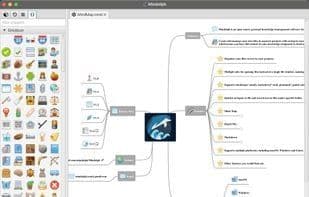

Product Information
What is Mindolph?
By saving to local storage, you can create and manage your own files in a separate workspace, which means you have full control over your knowledge compared to cloud solutions.
Organize files as a tree within the workspace.
GenAI supports mind maps, Markdown, PlantUML, and plain text editors, allowing you to generate or summarize text content via LLM APIs. Supported LLM providers include:
- OpenAI
- Alibaba Qwen
- HuoLaMa
- Google Gemini API
- Hugging Face API
- ChatGLM
- DeepSeek
Multiple tabs for opening files instead of single file windows make it easy to switch back and forth between files.
Supported file formats include mind maps (*.mmd), Markdown (*.md), PlantUML (*.puml), CSV tables (*.csv), and plain text (*.txt), with more formats to be supported in the future.
Save opened files as named collections to manage related files even across different workspaces.
Active outline view for opened files.
Summary feature to quickly insert predefined or user-defined summaries into mind maps, PlantUML, and Markdown files.
Fast navigation to any file and text search within files under any specific folder.
**Mind Maps:**
- Easily and quickly edit mind maps using shortcut keys.
- Supports themes, including some predefined ones (Classic, Light, and Dark), with the ability to customize themes by copying existing ones and freely styling any element.
- Supports notes, file links, URI links, images, and emojis for topic nodes.
- Import from other mind map formats such as FreeMind, MindMup, XMind, Coggle, and NovaMind.
- Export to other file formats like FreeMind, Markdown, image files (PNG/SVG), ASCIIDOC, etc.
- Compatible with mind map files created by the NetBeans-MMD-Plugin.
**PlantUML:**
- Syntax highlighting.
- Instant preview while editing.
- Export to image files and ASCII art.
**Markdown:**
- Syntax highlighting.
- Instant preview while editing.
- Export to PDF and HTML files.
**CSV Tables:**
- Visual display and editing of CSV files.
Supports multiple desktop platforms, including macOS, Windows, and Linux.
How to use Mindolph?
Mindolph is an open-source personal knowledge management software with Gen-AI support, allowing users to create and manage files in local storage for full control over their knowledge. It offers editing and organization features for multiple file formats and supports text generation or summarization via large language models.
Core Functions of Mindolph
Lightweight, privacy-focused, Markdown support, no tracking, syntax highlighting, no coding required
Lightweight, privacy-focused, MarkDown support, no tracking, syntax highlighting, no coding required
Usage Scenarios of Mindolph
- Create and manage personal files in a local workspace
- Use AI to generate or summarize mind maps, Markdown, and other text content
- Edit and organize mind maps with support for importing and exporting multiple formats
- Real-time preview and editing of PlantUML diagrams and Markdown documents
- Visual editing of CSV table files
- Quickly find, navigate files, and manage related file collections
Common Questions about Mindolph
What does Mindolph do?
How do I use Mindolph?
What are the core features of Mindolph?
What are the use cases for Mindolph?



















