



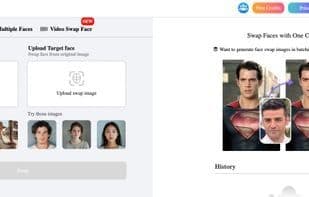

Product Information
What is Remaker ai?
Remaker AI is a comprehensive AI-powered image editing platform designed to revolutionize the way you create, enhance, and edit visuals. From professional-grade enhancements to creative customizations, Remaker AI offers a suite of cutting-edge tools to meet the diverse needs of individuals, designers, and businesses.
**Key Features of Remaker AI**
**Watermark Removal**
• Effortlessly remove watermarks from images and videos while preserving original quality.
• Supports batch processing to save time on extensive editing.
**Background Removal**
• Automatically and precisely eliminate backgrounds from images.
• Export with transparent backgrounds or choose from a variety of new backdrops.
**Image Enhancement**
• Upscale images without quality loss using AI-powered lossless enlargement.
• Restore old or blurry photos with state-of-the-art enhancement techniques.
**AI Stickers & Tattoos**
• Create custom AI-generated stickers and tattoos to personalize your images.
• Perfect for social media, digital art, and creative projects.
**AI Avatars**
• Generate unique and realistic AI avatars for personal use, branding, or creative purposes.
**Dozens of Other AI Tools**
• Explore a wide range of AI-driven tools for retouching, color correction, object removal, and more.
**Why Choose Remaker AI?**
• **User-Friendly Interface:** Designed for everyone, from beginners to professionals.
• **Fast & Reliable:** Achieve high-quality results with just a few clicks.
• **API Integration:** Access Remaker AI’s powerful features via its API for seamless workflow integration.
• **Versatility:** Whether for personal, creative, or commercial use, Remaker AI adapts to your needs.
Experience the future of image editing with Remaker AI at [https://remaker.ai/](https://remaker.ai/). Streamline your workflow and unleash your creativity with the power of AI!
How to use Remaker ai?
Remaker AI is a comprehensive AI image editing platform transforming how users create, enhance, and edit visual content, streamlining workflows and unlocking creativity with AI technology.
Core Functions of Remaker ai
Privacy-focused, lightweight, ad-free, no registration required, image-to-image generation, remove image background
Usage Scenarios of Remaker ai
- Remove Watermarks from Images and Videos with Batch Processing Support
- Automatically Remove Image Backgrounds for Product Photos or Designs
- Upscale or Restore Old, Blurry Images Without Quality Loss
- Create Custom AI-Generated Stickers, Tattoos, or Avatars
- Convert Images to Videos or Generate Anime, Ghibli-Style Images
- Quickly Generate Professional AI ID Photos and Upscale Videos to 4K Resolution
Common Questions about Remaker ai
What does Remaker AI do?
How do I use Remaker AI?
What are the core features of Remaker AI?
What are the application scenarios of Remaker AI?



















