




Product Information
What is Thinkbuddy?
Enhance your Mac with AI through listening, reading, and interaction, boosting productivity all day long. Completely free—up to 30 messages—try it now!
Designed for a seamless native macOS experience integrated with AI.
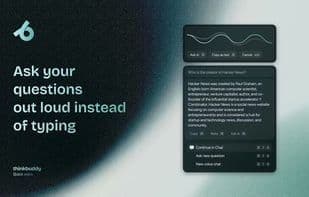
Set your shortcuts and transform the way you work. Got a question? Just ask aloud. Receive answers via GPT-4 or Claude 3. Quick query? Quick Chat is ready. Everything is at your fingertips.
**Use Your Voice:** Stuck somewhere? Take a screenshot and ask the AI.
**Capture & Ask:** Select text, press the shortcut, and the AI executes your spoken or typed command.
**Select & Run:** Create custom prompts and use them anytime, anywhere—saving you time.
**Use Custom Prompts:** Customize shortcuts, adapt quickly, and start using them right away.
**Custom Shortcuts:** Enjoy clutter-free prompts with our clipboard paste, intelligently adding your text.
**Copy, Paste & Ask:** Leverage OpenAI Whisper-powered commands to reply to emails and compose messages.
**You Speak, Whisper Transcribes:** Prefer Claude 3, Groq, Gemini, or GPT-4? Easily customize even at the prompt level.
**Choose Your Preferred Model:** Switch without monthly fees. Get the best Mac experience at a lower cost!
**Best Price Guaranteed:** Switch without monthly commitments. Enjoy the ultimate Mac experience for less!
How to use Thinkbuddy?
Thinkbuddy is a macOS AI assistant that listens, reads, and interacts, offering round-the-clock productivity assistance to simplify users' lives with AI.
Core Functions of Thinkbuddy
Ad-Free
Dark Mode
AI writing
AI chatbot
AI-Driven
Voice Recognition
AI writing
AI Chatbot
AI-Driven
Usage Scenarios of Thinkbuddy
- Ask questions verbally when issues arise
- Take a screenshot and query the AI
- Select text and use shortcuts for AI voice or text commands
- Create and use custom prompts
- Use speech-to-text to reply to emails and compose messages
- Intelligently append text via clipboard paste to generate concise prompts
Common Questions about Thinkbuddy
What does Thinkbuddy do?
How do I use Thinkbuddy?
What are the core features of Thinkbuddy?
What are the application scenarios of Thinkbuddy?



















