




Product Information
What is Web ai browser?
Built natively with SwiftUI, it offers a minimal, progressive browsing experience with integrated AI capabilities.
**Core Browsing**
- **WebKit Integration**: Native WebKit rendering with WKWebView
- **Tab Management**: Tab Hibernation for optimal performance
- **Keyboard Shortcuts**: Comprehensive shortcuts (⌘T, ⌘W, ⌘R, etc.)
- **Downloads**: Built-in download manager with progress tracking (testing required)
**Privacy & Security**
- **Private Mode**: Private browsing sessions
- **Ad Blocking**: Integrated ad-blocking service (testing required for disable option)
- **Password Management**: Secure password handling (testing required)
- **Privacy Settings**: Granular privacy controls (testing required)
**AI Integration**
- **On-Device AI Models**: Powered by Apple MLX and MLX Swift examples
- **MLX Framework**: Apple Silicon-optimized inference
- **Privacy-First**: AI processing occurs locally on-device
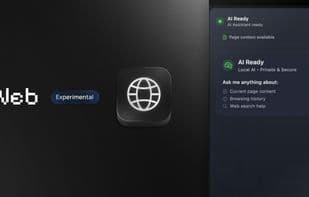
- **Smart Assistance**: AI sidebar integrated with TL;DR and PAGE + history context for web content analysis (still rough but fun to explore—enjoy!)
How to use Web ai browser?
Web AI Browser is a native macOS browser built with SwiftUI, offering a clean, progressive browsing experience integrated with on-device AI features (via Apple MLX) and privacy protections.
Core Functions of Web ai browser
Privacy-First, AI-Driven, Dark Mode, No Tracking, No Registration, No Ads
Usage Scenarios of Web ai browser
- Conduct private browsing sessions.
- Analyze web content to generate summaries (TL;DR) with page and historical context.
- Optimize browser performance with tab hibernation.
- Block ads using integrated ad-blocking services.
- Securely manage passwords.
- Navigate using comprehensive keyboard shortcuts.
Common Questions about Web ai browser
What does Web AI Browser do?
How do I use Web AI Browser?
What are the core features of Web AI Browser?
What are the use cases for Web AI Browser?



















