




Product Information
What is Add to search bar?
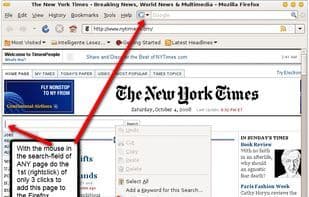
With the Firefox extension "Add to Search Bar," you can add any webpage's search functionality to the search bar with just 3 clicks (much faster than the Extension Mycroft Project). Combined with the extension "Organize Search Engines," you can maintain a clear overview of numerous search engines.
Instructions on how to use Add to Search Bar:
1. Navigate to the search engine
2. Hover your mouse pointer over the search box of the engine
3. Right-click (Mac: press CTRL and click)
4. Select "Add to Search Bar" from the context menu
5. Choose a name and icon, then press OK
Have you ever wanted a search engine in Firefox's search bar that doesn’t come by default, but the site lacks the glowing search bar icon to add its search (like YouTube)? Then this is the perfect tool for you.
Known Issues:
Some (very few) websites don’t work with Add to Search Bar (most notably Google Maps), and there’s nothing I can do about it. You can look for the engine on Mycroft. If you can’t find one, someone might be happy to create a search plugin for you on the Mozillazine forum.
Images:
First click: Just 3 clicks to add this page to Firefox’s search bar
After the third click: A new search engine appears in Firefox’s search bar
How to use Add to search bar?
Add to Search Bar is a Firefox browser extension that enables users to quickly add the search functionality of any webpage to Firefox's search bar in just three simple steps, addressing the issue where websites do not provide a default search add icon.
Core Functions of Add to search bar
Search bar
Usage Scenarios of Add to search bar
- Add search functionality for sites like YouTube (which don’t provide default search icons) to Firefox's search bar.
- Quickly integrate any webpage's search function into Firefox's search box.
- Works with the 'Organize Search Engines' extension for better management and overview of numerous custom search engines.
- When needing to add new site search functions faster than using the Mycroft Project.
Common Questions about Add to search bar
What does Add to Search Bar do?
How do I use Add to Search Bar?
What are the core features of Add to Search Bar?
What are the use cases for Add to Search Bar?
















