




Product Information
What is Advanced bookmark search?
This extension indexes all your bookmark items once and updates its index database whenever changes occur in your bookmark tree, such as adding, deleting, or modifying new bookmarks. The database can then be used to find matches using the extension's popup window. The search engine of this extension is highly powerful, supporting search operators like "OR," "AND," and "NOT," which can be used to narrow down search results with keywords. Refer to the FAQ page for more information.
Notes:
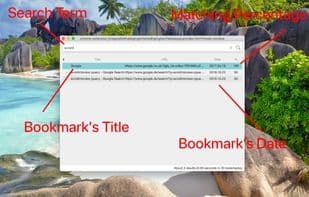
- This extension ranks matching results based on their relevance. The number in the last line of the results section indicates the match percentage.
- The initial indexing may take up to several minutes, depending on the total number of your bookmark items.
- To open results in a new browser tab, use the Enter key. To open in a background tab, use Ctrl/Cmd + Enter. To open in the current tab, use Shift + Enter.
- This extension indexes the database only once and does not reindex, as it monitors bookmark changes.
- The extension uses a non-persistent background page to prevent resource usage when idle.
- Numerous search keywords can be used alongside search operators to better refine results. Be sure to check them out on the FAQ page.
How to use Advanced bookmark search?
Advanced Bookmark Search is a browser extension for fast, offline bookmark searches, indexing and monitoring updates for easy management.
Core Functions of Advanced bookmark search
Bookmark
Favorites
Usage Scenarios of Advanced bookmark search
- Quickly find specific bookmarks among hundreds.
- Use search operators (e.g., 'OR' and 'AND') to narrow search results.
- Enter keywords in the search interface to quickly open bookmarks without browsing the bookmark tree.
- Open searched bookmarks in a new browser tab.
- Open searched bookmarks in a background tab.
- Open searched bookmarks in the current tab.
Common Questions about Advanced bookmark search
What does Advanced Bookmark Search do?
How do I use Advanced Bookmark Search?
What are the core features of Advanced Bookmark Search?
What are the application scenarios of Advanced Bookmark Search?
















