




Product Information
What is Anybox?
Anybox is a modern bookmark manager for macOS and iOS, serving as an essential productivity tool.
Beyond automatically fetching link titles and site icons, Anybox can also retrieve preview images and descriptions from sites that support Open Graph. You can also modify all link metadata.
Links can be saved using copy and paste, drag and drop, AppleScript, macOS services, the share menu, keyboard shortcuts, URL schemes, and more. Anybox also supports saving notes, images, and files. You can store frequently used snippets—such as ID numbers or email addresses—in Anybox and then paste them directly from the Mac app or tap to copy them in the iOS app.
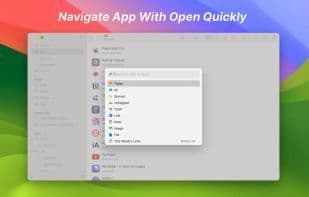
When you're outside the app, you can activate Quick Lookup, a Spotlight-like interface, using a global keyboard shortcut or modifier key to search and open links. Anybox also features Smart Lists, which automatically categorize links by attributes like addition date or domain.
Anybox is a modern bookmark manager for macOS and iOS. It leverages native technologies to provide users with the simplest way to save and open links, making it a vital productivity tool for your daily workflow.
How to use Anybox?
Anybox is a modern bookmark manager for macOS and iOS, designed to help users effortlessly save, organize, and access web links, notes, images, and files, enhancing daily productivity.
Core Functions of Anybox
Native App
Usage Scenarios of Anybox
- Quickly save webpage links via copy-paste, drag-and-drop, share menus, and more.
- Save frequently used text snippets (like ID numbers, email addresses) and paste them quickly with the 'Quick Find' feature.
- Use global shortcuts to activate the 'Quick Find' interface for fast searching and opening saved links.
- Automatically categorize and organize links with smart lists based on attributes like addition date or domain.
- Archive important webpages as PDFs, Web Archives, or screenshots to prevent loss.
- Use widgets to track reading lists or quickly save clipboard content.
Common Questions about Anybox
What does Anybox do?
How do I use Anybox?
What are the core features of Anybox?
What are the use cases for Anybox?
















