




Product Information
What is Auto tab discard?
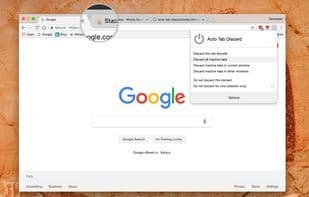
Auto Tab Discard is a lightweight extension that uses native methods (tabs.discard) to unload or suspend browser tabs, significantly reducing memory usage when many tabs are open. If you work with many open tabs, this extension helps keep your browser fresh by parking (hibernating) inactive tabs, saving up to 80% of used memory. This also helps portable devices save battery. Features: Speed up your browser and minimize memory usage—tabs can be automatically suspended after a configurable period of inactivity or manually from the toolbar popup. Whitelist domains to avoid auto-suspension. Suspended tabs are preserved after closing and reopening the browser (using the browser's session restore feature). Tab favicons show suspension status (if the icon is opaque, the tab is discarded). All information (e.g., scroll position or text box content) is restored when the tab becomes visible again. No JavaScript or DOM events are active when a tab is discarded—it's essentially paused. Options: Customize when tabs are discarded—exclude pinned tabs, tabs with active media playback, when the computer is on power, or when there are unsaved form changes. Note: Set the period to zero in the options page to prevent auto-discarding.
How to use Auto tab discard?
Auto Tab Discard is a lightweight browser extension that significantly reduces browser memory usage by automatically or manually suspending inactive tabs, improving speed and saving battery life on portable devices. It uses native methods to unload tabs, ensuring smooth browser performance even with numerous tabs open.
Core Functions of Auto tab discard
Low memory usage
Memory footprint
Memory optimization
Microsoft Edge extension
Opera extension
Usage Scenarios of Auto tab discard
- Reduce memory usage when opening multiple tabs.
- Save battery life when using browsers on portable devices.
- When browser RAM usage is high or performance lags due to numerous tabs.
- Prevent background scripts of inactive tabs from consuming computing resources.
- Keep many tabs open while ensuring smooth browser responsiveness.
Common Questions about Auto tab discard
What does Auto Tab Discard do?
How do I use Auto Tab Discard?
What are the core features of Auto Tab Discard?
What are the application scenarios for Auto Tab Discard?
















