
Product Information
What is Bookmark dupes?
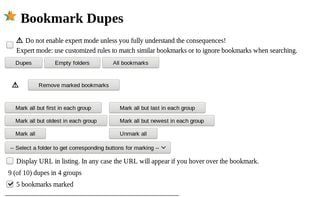
After installing the Bookmark Dupe tool, the basic usage is straightforward: to open it, click on the extension icon (the duplicated star) or use the link on the extension's options page. Then select what you'd like to display: duplicate bookmarks, empty folders, non-deleted bookmarks, or all bookmarks, after which you'll be presented with a list of bookmarks accompanied by checkboxes. There are also buttons to (un)select convenient sets of items. Finally, there appear to be buttons to delete the selected bookmarks (or move them to a "Trash" folder) or to strip the descriptions from the selected bookmarks.
Default language: en
Complete translations: AR, DE, ES, RU, SV_SE, UK
Mostly but not entirely complete translations: zh_cn
How to use Bookmark dupes?
Bookmark Dupes is a browser extension designed to help users manage bookmarks by displaying and removing duplicate bookmarks or empty folders, keeping the bookmark list tidy.
Core Functions of Bookmark dupes
Lightweight, no registration, ad-free
Lightweight, no registration, ad-free
Usage Scenarios of Bookmark dupes
- Find and remove duplicate bookmarks in the browser.
- Identify and delete empty bookmark folders.
- View a list of all non-duplicate bookmarks.
- Move selected duplicate bookmarks to a specific 'Dupes' folder.
- Batch clear descriptions of selected bookmarks.
Common Questions about Bookmark dupes
What does Bookmark Dupes do?
How do I use Bookmark Dupes?
What are the core features of Bookmark Dupes?
What are the application scenarios for Bookmark Dupes?