



Product Information
What is Clear browsing data?
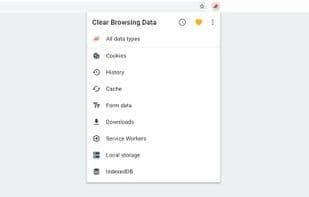
Clear Browsing Data is a Firefox extension that allows you to delete browsing data directly from the browser toolbar, such as cookies, history, and cache. The toolbar button can be configured to clear all browsing data with a single click or to display a list of data types available for clearing.
Thanks to the incredible support from backers, the ongoing development of Clear Browsing Data is possible. If you'd like to join them, consider contributing via Patreon, PayPal, or Bitcoin.
The extension also supports closing and reloading tabs, features that can be configured in the extension's options.
Supported data types include:
- Cookies
- Browsing history
- Cached images and files
- Autofill form data
- Download history
- Service workers
- Plugin data
- Saved passwords
- Indexed data
- Local storage data
The types of data that can be cleared and their order can be customized in the extension's options.
How to use Clear browsing data?
Clear Browsing Data is a Firefox extension that enables users to delete browsing data like cookies, history, and cache directly from the browser toolbar, offering convenient data clearing.
Core Functions of Clear browsing data
Microsoft Edge extensions
Opera extension
Data cleaning
Usage Scenarios of Clear browsing data
- Clear all browsing data with one click.
- Selectively clear specific data types like cookies or download history.
- Customize the types of data to clear and their order.
- Close and reload browser tabs.
Common Questions about Clear browsing data
What does Clear Browsing Data do?
How do I use Clear Browsing Data?
What are the core features of Clear Browsing Data?
What are the use cases for Clear Browsing Data?