




Product Information
What is Comodo free firewall?
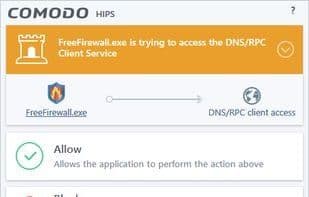
Comodo Firewall is a personal firewall, a type of security software that safeguards your PC by managing internet traffic on an application-by-application basis. The most notable feature of personal firewalls is the pop-up notification generated when an unknown program attempts to access the internet for the first time. This mechanism blocks trojans, botnets, hackers seeking remote access, malicious cryptocurrency miners, and even volatile applications that transmit private data without consent. However, due to these pop-up notifications, this security software has both its advocates and critics. Comodo Firewall helps reduce the number of pop-ups by recognizing well-known and digitally signed applications.
Comodo Firewall also includes Host-based Intrusion Prevention (HIPS) and sandboxing. HIPS monitors applications for suspicious behavior, such as attempts to inject themselves into other programs. This component offers enhanced security at the cost of reduced user convenience, requiring users to carefully weigh the trade-offs before use.
The sandbox (referred to in different versions as containment, sandbox, or virtualization) runs specified applications within a controlled environment, preventing permanent, irreversible changes to the system. If an application tries to modify a file, the sandbox system provides a copy for that application to alter, leaving the original file untouched. Sandboxing is particularly useful for testing applications.
How to use Comodo free firewall?
Comodo free firewall is a personal firewall software that protects computers by monitoring and controlling application network traffic, blocking trojans, botnets, hackers, and malicious programs from unauthorized internet access or data transmission. It aims to provide an additional security layer to prevent system threats from the internet.
Core Functions of Comodo free firewall
Focus on security
Firewall
Usage Scenarios of Comodo free firewall
- Block unknown programs' initial internet access attempts to prevent malware
- Prevent cryptojacking and privacy-data-stealing apps from running
- Safely test new apps via sandboxing without permanent system changes
- Monitor apps for suspicious behaviors like injection attempts
- Specify internet-accessible apps and receive suspicious activity alerts
- Hide computer ports from hackers and block malware data exfiltration
Common Questions about Comodo free firewall
What does Comodo Free Firewall do?
How do I use Comodo Free Firewall?
What are the core features of Comodo Free Firewall?
What are the use cases for Comodo Free Firewall?
















