




Product Information
What is Cookies manager+?
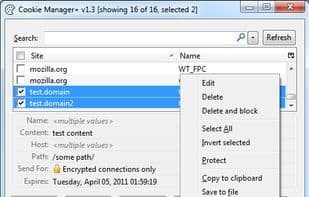
Cookies Manager for viewing, editing, and creating new cookies. It also displays additional information about cookies, allows editing multiple cookies at once, and backing up/restoring them.
Features:
- Complete replacement of the built-in cookie viewer (optional)
- Ability to change a cookie's domain, path, and name
- Capability to edit multiple cookies simultaneously
- Option to save as new or replace the original cookie when domain, path, or name is altered
- Automatic monitoring of cookie changes and updating information in the window
- Filter auto-application while typing
- Customize cookie information display: reorder, show/hide fields and columns
- Export cookie data to clipboard or file using customizable templates
- Backup/restore all or selected cookies. When restoring only selected cookies, others in the backup are ignored without affecting existing cookies.
- Directly edit expiration dates in the "Expires" field without selecting "New Date"
- "Add Cookie" window auto-fills domain and path fields based on selected cookies (if any)
- Pressing Enter on a selected cookie opens the edit window; pressing DEL deletes it
- Clicking the "Cookies Manager+" button/menu option brings an already open window to the front
- Window title changes when editing or adding a new cookie
- Most info fields are available as sortable list columns
- Option to keep the window on top of all other Firefox windows
- Shows extra cookie details like creation and last access times
- Keyboard-accessible and screen-reader friendly (95% compatible with JAWS, though some dropdown labels may be overlooked)
- Automatically removes expired cookies
- Settings to mark cookies as secure, HTTP-only, or set expiration fields to read-only
How to use Cookies manager+?
Cookies Manager+ is a tool for viewing, editing, creating, backing up, and restoring browser cookies, giving users comprehensive control over cookie information.
Core Functions of Cookies manager+
Customizable, Legacy Firefox Add-on
Customizable
Legacy Firefox Add-on
Usage Scenarios of Cookies manager+
- View, edit, and create new browser cookies.
- Bulk modify attributes of multiple cookies.
- Backup and restore important cookie data.
- Export cookie information to a file or copy to clipboard.
- Customize how cookie information is displayed.
- Automatically delete expired cookies.
Common Questions about Cookies manager+
What does Cookies Manager+ do?
How do I use Cookies Manager+?
What are the core features of Cookies Manager+?
What are the use cases for Cookies Manager+?
















