




Product Information
What is Country flags & ip whois?
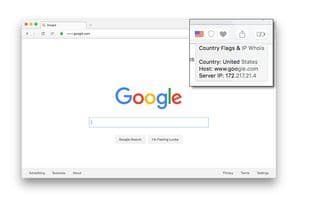
"Country Flags & IP Whois" adds a toolbar/address bar button with an icon indicating the current location of the website's server. This information is extracted from the IP address of the responding server. The extension includes a built-in table that converts provided IP addresses into national flags.
The extension features a lightweight database capable of translating any IP address into an ISO country code. To remain as lightweight as possible, the database is highly optimized and compressed. As a result, no external resources are involved during IP resolution. For additional information, clicking the toolbar button directs you to a detailed information page.
Available tools in the right-click menu (only 5 menu items are visible in the root menu):
- **SSL Checker**
- **Traceroute**
- **Ping**: Test reachability
- **TinyURL**: Shorten URLs using tinyurl.com
- **DNS Lookup**: Perform authoritative DNS lookups
- **WHOIS Lookup**: Find domain registration and delegation details
- **HTTP Headers**: List all response HTTP headers
- **Copy IP**: Copy to clipboard
- **Alexa**: Website traffic, statistics, and analysis
- **WOT Scorecard**: Website reputation rating
- **VirusTotal**: Free virus, malware, and URL scanning service
- **Check Server Status**: Helps determine if a website is down
- **Google Translate**: Free service for instant translation of words, phrases, and web pages
- **Google Cache**: View Google's cached version of any website
- **Wikipedia**: Domain search
- **INTODNS**: Check DNS and mail server health and configuration
- **Netcraft**: Provides internet security services, including anti-fraud and anti-phishing
- **WAVE Report**: Offers web accessibility solutions
- **validate.nu**: HTML5 validator
- **W3C CSS Validator**: CSS validator
- **W3C Validator**: HTML5 validator
- **Internet Archive**: Free universal access to archived web pages
- **Google**: Search by domain
- **Wolfram|Alpha**: Access global facts and data
Custom commands accept the keywords `[ip]`, `[host]`, `[curl]`, `[enurl]`, and `[url]`.
How to use Country flags & ip whois?
Country Flags & IP Whois is a browser extension that helps users quickly identify the actual geographic location of a website's server by displaying the country/region flag icon of the current website, along with a series of IP and host-related utility tools.
Core Functions of Country flags & ip whois
Support for WebExtensions
Browser Extension
Browser-based
Support for WebExtensions, Browser Extensions, Browser-Based
Usage Scenarios of Country flags & ip whois
- Quickly identify the actual geographic location of a website server.
- Assist in determining if a website poses potential risks.
- Check a website's SSL certificate information.
- Query domain registration and delegation information.
- Perform authoritative DNS queries.
- Test server reachability (Ping).
Common Questions about Country flags & ip whois
What does Country Flags & IP Whois do?
How do I use Country Flags & IP Whois?
What are the core features of Country Flags & IP Whois?
What are the use cases for Country Flags & IP Whois?
















