




Product Information
What is Dark mode / night reader?
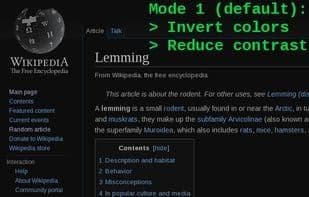
Invert page colors to display white text on a dark background, reducing eye strain.
Particularly effective for those working at night or in low-light environments.
Click the button in the icon bar to toggle between supported modes:
Mode 1 (Default): Invert colors and reduce contrast
Mode 2: Invert colors, normal (high) contrast
Mode 3: Only reduce contrast
Mode 4: Disable.
Settings are saved individually per website.
Right-click the button to access the options page, where you can change the default mode (for all pages).
How to use Dark mode / night reader?
Dark mode / night reader is a browser extension that inverts page colors, turning white backgrounds to black and black text to white, reducing eye strain, especially for those working at night or in low-light environments.
Core Functions of Dark mode / night reader
Dark Mode
Usage Scenarios of Dark mode / night reader
- Browse the web while working at night.
- Read web content in low-light environments.
- Reduce eye strain during prolonged web browsing.
- Read pages containing charts and text.
Common Questions about Dark mode / night reader
What does Dark mode / night reader do?
How do I use Dark mode / night reader?
What are the core features of Dark mode / night reader?
What are the use cases for Dark mode / night reader?
















