




Product Information
What is Easy reader?
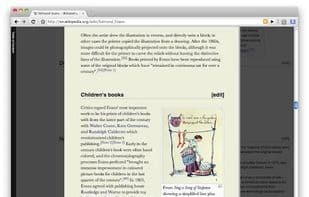
EasyReader allows for customization and enhances the readability of lengthy online articles.
Make any article or part of a website more readable!
How to use:
1. Click the extension button.
2. Select the content you wish to read on the page.
3. Enjoy.
Features:
✔ Provides a table of contents on the left.
✔ Colors, size, font, etc., are fully customizable.
✔ Print only the selected content.
✔ Highlights code snippets without requiring additional style snippets.
Tips:
✔ Drag the right edge of the content to adjust its width.
✔ Images can be used, not just customized backgrounds.
Example of background color usage: url("http://antonj.se/resources/css/images/prape-texture-warm.gif")
✔ Hover labels on the options page will show you the actual CSS properties being used.
How to use Easy reader?
EasyReader is a Chrome browser extension designed to enhance the reading experience of long web articles or website sections by customizing settings for better readability.
Core Functions of Easy reader
Readability
Reading
Typography
Web-Based
Typography
Usage Scenarios of Easy reader
- When reading lengthy online articles, customize their display style to enhance readability.
- Make specific content or sections of an article on a webpage more readable.
- Print only the selected content on the webpage, not the entire page.
- Provide syntax highlighting for code snippets within web pages.
- Adjust the width of reading content to suit personal preferences.
- Customize the reading interface background with images or colors.
Common Questions about Easy reader
What does EasyReader do?
How do I use EasyReader?
What are the core features of EasyReader?
What are the application scenarios for EasyReader?




















