




Product Information
What is Favoritekeys?
The fastest way to bookmark. Manage your URLs better with keywords.
The quickest method to save bookmarks using your preferred keywords (#blog, #travel, #project, etc.). It helps efficiently retrieve webpages using keywords and search. Managing these keywords is easy and effective through the dashboard.
**How to use?**
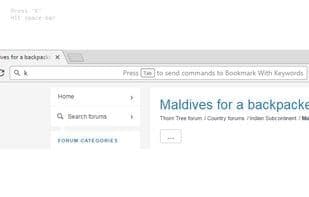
For the webpage you want to bookmark, go to the address bar:
- Press the **"K"** key
- Press the **Spacebar**
- Enter a keyword for the webpage
- Press the **Enter** key. Done!
Your keyword will be saved along with the bookmarked webpage.
To retrieve the same webpage, go to the address bar:
- Press the **"K"** key
- Press the **Spacebar**
- Enter your keyword
- Webpage URLs with the same keyword will start appearing in the suggestions below
Bookmarks are saved in the Chrome browser, so you can access/search them from any device.
You’re free to choose your own keyword format. You can use **#** or any other symbol of your choice.
Examples: #blog, $success, !warning, @family, @health, Life, Gadget.
It’s completely free and serverless (so we don’t store any of your information).
How to use Favoritekeys?
Favoritekeys is a browser extension that offers quick bookmark saving and URL management through keywords, aiding users in more efficiently retrieving web pages to enhance productivity.
Core Functions of Favoritekeys
Extendable via plugins/extensions
Extensible via plugins/extensions
Usage Scenarios of Favoritekeys
- Quickly save web bookmarks using custom keywords (e.g., #blog, #travel, #project).
- Quickly search saved web pages by entering keywords in the address bar.
- Effectively organize and manage a large number of URL links.
- Sync and access bookmarks across different devices.
Common Questions about Favoritekeys
What does Favoritekeys do?
How do I use Favoritekeys?
What are the core features of Favoritekeys?
What are the use cases for Favoritekeys?
















