




Product Information
What is Firefox multi-account containers?
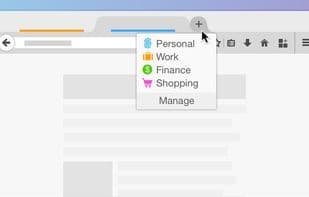
The Firefox Multi-account Containers extension allows you to assign a separate box for each of your online lives—no more switching browsers to check your work email! Here's a quick video showing how it works.
Under the hood, it segregates website storage into tab-specific containers. Cookies downloaded by one container aren't accessible to others. With the Firefox Multi-account Containers extension, you can...
- Log into two different accounts on the same site (e.g., access your work email and personal email in separate container tabs).
- Keep different types of browsing isolated (e.g., manage your checking account in one container tab while searching for new songs from your favorite band in another).
- Avoid leaving social media footprints across the web (e.g., log into social networks in a container tab while browsing news sites in another, keeping your social identity separate from tracking scripts on news sites).
After installing the Firefox Multi-account Containers extension, click the container icon to customize it. Change its color, name, and icon. Long-press the "New Tab" button to open a new container tab.
**Privacy in Firefox Multi-account Containers**
The extension does not send any information to Mozilla.
**Haven’t I seen this in Firefox before?**
Firefox Multi-account Containers originated as "Containers," initially available only in Firefox Nightly. It evolved as a test pilot experiment where we refined the user experience and added new features. Now, it exists as an extension installable by all Firefox users.
While the built-in functionality is still available in Nightly, we recommend this extension for its richer user experience.
How to use Firefox multi-account containers?
Firefox Multi-Account Containers is a Firefox browser extension that allows users to isolate different online activities into separate "container" tabs. By segregating website storage and cookies, it enables users to log into multiple accounts on the same site, maintain privacy across different browsing activities, and prevent social network tracking.
Core Functions of Firefox multi-account containers
Privacy-Focused
Lightweight
Customizable
Multi-profile
Support multi-account
Multi-Account Switching
Usage Scenarios of Firefox multi-account containers
- Log into two different accounts on the same website, e.g., work email and personal email in different container tabs.
- Separate different types of browsing activities, e.g., using one container tab for managing bank accounts and another for searching music.
- Avoid social network footprints across the web, e.g., using one container tab for social networks and another for news sites, isolating social identities from tracking scripts.
- Combine with Mozilla VPN to shop while traveling abroad but check bank accounts from home country servers, protecting browsing activity and location.
Common Questions about Firefox multi-account containers
What does Firefox Multi-Account Containers do?
How do I use Firefox Multi-Account Containers?
What are the core features of Firefox Multi-Account Containers?
What are the use cases for Firefox Multi-Account Containers?
















