




Product Information
What is Floatbrowser?
FloatBrowser, a slimy browser that sits atop your windows.
With FloatBrowser, you can:
- Browse the web atop your desktop, seamlessly floating above other windows.
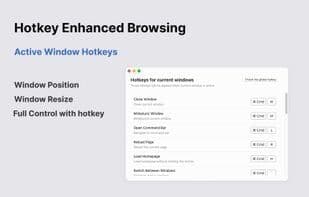
- Enjoy hotkey support—create, close, resize, and switch windows, all done effortlessly with hotkeys.
- Automatically refresh your web pages, so you don’t have to do it manually.
- Pin your favorite websites in the Menubar for quick access whenever you want.
- Keep the browser window transparent and borderless, blending seamlessly into your workspace.
- Supports userscripts, allowing you to customize and perform specialized tasks.
Give FloatBrowser a try—it won’t let you down!
We welcome your feedback. If you have any questions, issues, or suggestions, feel free to reach out. Email: [email protected]
Thank you.
How to use Floatbrowser?
FloatBrowser is a menu bar browser for Mac that always stays on top of other windows, helping users keep their browser visible during multitasking to enhance productivity.
Core Functions of Floatbrowser
No Registration Required
Usage Scenarios of Floatbrowser
- Track live sports, news, or video chats while multitasking.
- Professionals and multitaskers can continuously access information without frequent app switching while interacting with other applications.
- Browse the web at the top of the desktop, seamlessly floating above other windows.
- Automatically refresh web pages without manual intervention.
- Pin frequently used web pages to the menu bar for quick access.
Common Questions about Floatbrowser
What does FloatBrowser do?
How do I use FloatBrowser?
What are the core features of FloatBrowser?
What are the use cases for FloatBrowser?
















