




Product Information
What is Humble new tab page?
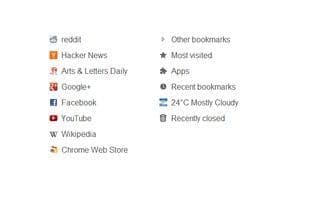
The redesigned new tab page includes your bookmarks, apps, most visited sites, and recently closed tabs in a customizable layout.
Features:
Simple, clean design
Highly customizable
Fast loading and lightweight
This extension replaces the default new tab page. Drag folders to create new columns or rearrange them. Fonts, colors, spacing, and more can be customized from the options menu.
How to use Humble new tab page?
Humble New Tab Page is a browser extension that redesigns the new tab page to display bookmarks, apps, frequently visited sites, and recently closed pages in a customizable layout, offering a clean, customizable, and fast-loading experience.
Core Functions of Humble new tab page
Customizable
Configurable
Minimalist
Speed Dial
Usage Scenarios of Humble new tab page
- Customize the layout and content of your browser's new tab page
- Quickly access bookmarks, frequently visited sites, and recently closed pages
- Adjust the font, color, and spacing of the new tab page to personal preferences
- Organize columns in new tab pages by dragging and dropping folders.
Common Questions about Humble new tab page
What does Humble New Tab Page do?
How do I use Humble New Tab Page?
What are the core features of Humble New Tab Page?
What are the use cases for Humble New Tab Page?
















