
Product Information
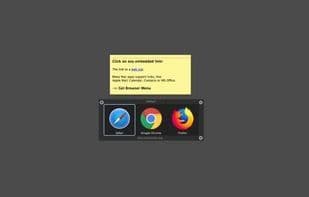
What is Lincastor browser?
Open with Other Options
Lincastor also supports local files. Sometimes, you may want to open a file with two different applications depending on the task at hand. For instance, you might need to view an image in Preview but edit it in Photoshop. Lincastor’s menu makes it easy to select the right app for the job.
Powerful Reference Lookup Tool
Select text, right-click to access the service context menu, and choose "Look Up Text with URL." LinCastor Browser can associate text patterns with specific query links and browsers. For example, you can use Google or convert text to CINCEN with Wolframalpha.
Pair Any Link with a Browser
Google Docs works best in Chrome, or you might need to load an old website in Internet Explorer while using Safari for everything else. LinCastor Browser rules make it simple to match links meeting certain criteria with the correct browser. You can even use custom URL patterns like "gropen" or X-Callbacks.
It also includes its own web view, perfect for quick lookups.
Share Services Everywhere
Neither Google Chrome nor Firefox natively support OS X sharing services. LinCastor Browser lets you perform sharing services on any link. Now with iOS Handoff support.
How to use Lincastor browser?
LinCastor Browser is a tool that enables users to decide which browser to use for opening links or which application to use for local files, based on preset rules or manual selection. It also offers robust text search and OS X sharing service capabilities.
Core Functions of Lincastor browser
Quick reference lookup, custom URLs
Quick reference search, custom URLs
Usage Scenarios of Lincastor browser
- When clicking a link, choose which browser to open it with.
- Open local files with different applications based on task needs, such as previewing images or editing with Photoshop.
- After selecting text, quickly perform actions via the right-click menu, such as using Google Translate or converting units with WolframAlpha.
- Set rules to automatically open specific links (e.g., Google Docs) in a designated browser (e.g., Chrome) or load older websites in legacy browsers.
- Perform OS X sharing services on any link and support iOS Handoff.
- Developers easily switch between browsers for website testing and debugging.
Common Questions about Lincastor browser
What does LinCastor Browser do?
How do I use LinCastor Browser?
What are the core features of LinCastor Browser?
What are the use cases for LinCastor Browser?