




Product Information
What is Mylensai-chrome?
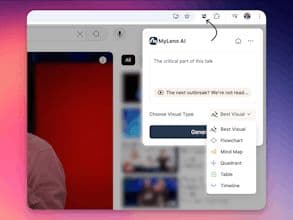
The MyLensAI Chrome extension transforms any webpage or YouTube video into a quick, visual summary. With just one click, get key points in mind maps, timelines, tables, and more. Save time, learn faster, and focus on what matters most.
How to use Mylensai-chrome?
The MyLens AI Chrome extension transforms any webpage or YouTube video content into visual summaries with a single click, presenting key information through mind maps, timelines, tables, and more, helping users save time, accelerate learning, and focus on the essentials.
Core Functions of Mylensai-chrome
Convert web and YouTube video content into visual summaries
One-click extraction of key information and generation of various visual charts (e.g., mind maps, timelines, flowcharts)
Supports custom focus content to highlight user-needed information
Provide summary downloads and workspace customization
Usage Scenarios of Mylensai-chrome
- Students and educators convert textbooks, articles, courses, and videos into visual summaries for learning and teaching
- Professionals and business teams analyze reports and summarize industry articles
- Busy learners quickly grasp key points from web pages and videos
- Users needing quick comprehension of complex online information
Common Questions about Mylensai-chrome
What does MyLens AI do?
How do I use MyLens AI?
What are the core features of MyLens AI?
What are the application scenarios for MyLens AI?
















