




Product Information
What is Native video?
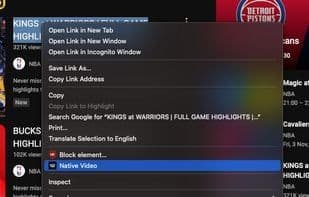
Enhance your online video streaming experience with the 'Native Video' Chrome extension. Say goodbye to distractions and enjoy an ad-free experience while watching your favorite videos. The setup for 'Native Video' is user-friendly—no complicated settings or complex interfaces. The power is in your hands with a simple right-click. 'Native Video' simplifies ad-blocking by integrating directly into your browser's context menu. Just right-click on any link to a webpage with video content, and you'll find the 'Native Video' option. A single click activates the ad-blocking magic, ensuring your video experience remains uninterrupted.
How to use Native video?
Native Video is a Chrome extension designed to enhance users' online video streaming experience by offering an ad-free viewing experience, eliminating distractions and interruptions.
Core Functions of Native video
Privacy-focused: no sign-up, ads, or tracking
Usage Scenarios of Native video
- Avoid ads while watching favorite online videos.
- Quickly enable ad-blocking on web pages with video content via right-click menu.
- Simplify video streaming for a seamless viewing experience.
Common Questions about Native video
What does Native Video do?
How do I use Native Video?
What are the core features of Native Video?
What are the use cases for Native Video?
















