




Product Information
What is Open in instapaper text?
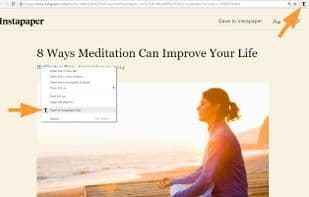
The Chrome extension will allow web pages to be opened in "Reader View" directly from the right-click context menu, eliminating the need to first open them in the standard view.
How to use Open in instapaper text?
Open in Instapaper Text is a Chrome extension that allows users to open web pages directly in Instapaper Text reading view via the toolbar icon, keyboard shortcut, or right-clicking a link, skipping the original page load for a clean, readable experience.
Core Functions of Open in instapaper text
Toggle Reading Mode
Toggle Reading View
Usage Scenarios of Open in instapaper text
- Quickly open a webpage's reading view via the toolbar icon.
- Use keyboard shortcuts to switch the current page to Instapaper Text mode.
- Right-click links to open them directly in a new tab in Instapaper Text format without loading the original page.
- Open websites directly in reading view on the first click in the browser.
- Convert webpage content into a clean, easy-to-read format.
Common Questions about Open in instapaper text
What does Open in Instapaper Text do?
How do I use Open in Instapaper Text?
What are the core features of Open in Instapaper Text?
What are the application scenarios of Open in Instapaper Text?
















