




Product Information
What is Page refresh?
Do you ever need a tab to automatically refresh?
If so, then this very simple extension is exactly what you're looking for.
To use the extension, simply press CTRL+Shift+R (or CMD+Shift+R on Mac).
Features:
- Press Ctrl+Shift+R (or CMD+Shift+R on Mac) to automatically refresh the page every minute.
- Option to hide the icon if not needed.
- Press the same key combination again to stop the refresh.
- Interacting with the page (key press or mouse click) will reset the refresh timer.
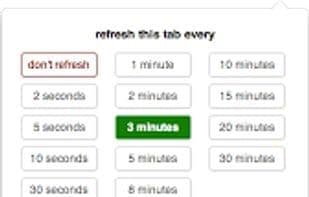
- Click the icon to set the interval for the current tab.
- Remembers the last scroll position and restores it upon reload.
How to use Page refresh?
Page Refresh is a browser extension designed to help users automatically refresh (reload) idle pages and set refresh intervals as needed. Its core value lies in automating page updates, eliminating the hassle of manual operations.
Core Functions of Page refresh
As above
Legacy Firefox add-on
Hashtags
Page Builder
Page Refresh
Automatic Refresh
It reads
Traditional Firefox plugin
Tags
Page builder
Usage Scenarios of Page refresh
- When users want a page (tab) to auto-refresh.
- When a page is idle and needs to reload at selected intervals.
- When a page needs to auto-refresh every minute.
- After interacting with a page (key press or mouse click), restart the refresh timer.
Common Questions about Page refresh
What does Page Refresh do?
How do I use Page Refresh?
What are the core features of Page Refresh?
What are the use cases for Page Refresh?
















