




Product Information
What is Pluma spell checking?
Spell Check and Edit Text.
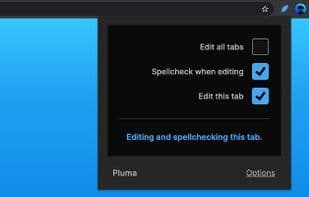
Pluma enables you to spell and edit text while browsing. Proofreading and models change with visual feedback. Save time by exploring possibilities without the need for slower document and image editing programs.
Features
• Edit text while browsing.
• Spell check as you edit.
Limitations
Editing and spell checking are provided by your browser. The more capable your browser is, the better your experience will be.
For a complete list of limitations, please read the accompanying guide after installation.
How to use Pluma spell checking?
Pluma Spell Checking is a browser extension that enables users to perform spell checks and text editing while browsing, providing instant visual feedback to save time on using other editing applications.
Core Functions of Pluma spell checking
Spell Check, Microsoft Edge Extension
Usage Scenarios of Pluma spell checking
- Perform spell checks and text editing while browsing the web.
- Proofread text and simulate edits, viewing effects instantly.
- Explore text modification possibilities without opening other documents or image editing programs.
Common Questions about Pluma spell checking
What does Pluma Spell Checking do?
How do I use Pluma Spell Checking?
What are the core features of Pluma Spell Checking?
What are the use cases for Pluma Spell Checking?
















