




Product Information
What is Powerlet?
Powerlet enables quick keyboard access to bookmarks.
How to use Powerlet?
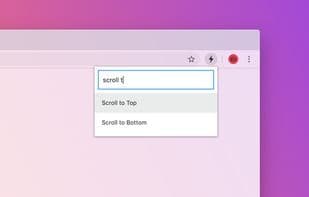
Powerlet is a Chrome extension designed to let users quickly access and run their bookmarklets via keyboard, enhancing operational efficiency on web pages.
Core Functions of Powerlet
Script Support
Command palette
Usage Scenarios of Powerlet
- Quickly bring up the Powerlet interface using keyboard shortcuts (e.g., CMD + SHIFT + K or CTRL + SHIFT + K).
- Search for JavaScript scripts stored in bookmarks by entering keywords.
- Quickly run filtered bookmark scripts on the current webpage.
- Manage (add, edit, and delete) personal bookmark scripts.
- Use in dark mode, where interface icons and themes update automatically.
Common Questions about Powerlet
What does Powerlet do?
How do I use Powerlet?
What are the core features of Powerlet?
What are the application scenarios for Powerlet?
















