
Product Information
What is Privacy badger?
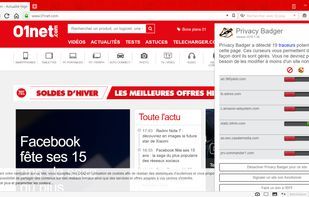
Privacy Badger is a browser add-on tool that analyzes websites to detect and block content that tracks you in an intrusive, non-consensual manner. As you browse the web, your copy of Privacy Badger notes the "third-party" domains embedded in the pages you visit—such as images, scripts, and ads. If a third-party server appears to be tracking you without permission, using uniquely identifying cookies to compile a record of your visits across multiple sites, Privacy Badger will automatically block content from that third-party tracker. In some instances, third-party domains provide essential aspects of a page's functionality, like embedded maps, images, or fonts. In such cases, Privacy Badger will permit connections to the third party but will filter out its tracking cookies.
How to use Privacy badger?
Privacy Badger is a browser add-on designed to protect online privacy by automatically detecting and blocking invisible trackers that monitor users without consent.
Core Functions of Privacy badger
Lightweight
Privacy-first
Block Trackers
Browser Extension
Dark Mode
No Tracking
Usage Scenarios of Privacy badger
- Automatically block third-party trackers from collecting user data while browsing
- Prevent uniquely identifying cookies from recording browsing history across multiple websites
- Remove outbound link click tracking on platforms like Facebook, Google, and Twitter
- Convert embedded media (e.g., maps, images, fonts) into placeholders while filtering out their tracking cookies
- Add Global Privacy Control (GPC) support for browsers without built-in GPC
Common Questions about Privacy badger
What does Privacy Badger do?
How do I use Privacy Badger?
What are the core features of Privacy Badger?
What are the use cases for Privacy Badger?