




Product Information
What is Profilelauncher?
The primary purpose of ProfileLauncher is to launch Safari with specific profiles. It is only compatible with English language environments, as it heavily relies on the English names of the profiles.
Installation and Setup:
Download the application using the link above. Unzip the application and move it to the Applications folder.
Launch the application. You will see the ProfileLauncher icon in the menu bar.
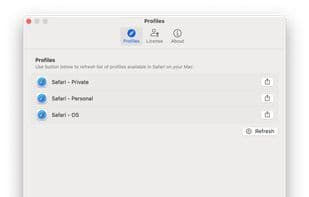
Go to the "Settings…" menu item and click the "Refresh" button to load all available profiles. The application will request several permissions to access Safari profiles and launch Safari with a specific profile.
Next to the profile list, you will find a button to export the application. Click it to export the helper applications and save them under ~/Applications.
Now, you can launch Safari with a specific profile by clicking the corresponding menu item. Alternatively, you can use Spotlight (or Raycast or Alfred) to launch the helper applications.
How to use Profilelauncher?
ProfileLauncher is a menu bar app for launching Safari with specific profiles, simplifying multi-profile management.
Core Functions of Profilelauncher
Lightweight
Ad-Free
No Tracking
No Registration Required
Safari integration
Safari extension
Lightweight
Usage Scenarios of Profilelauncher
- Launch Safari by clicking the profile option in the menu bar.
- Use tools like Spotlight, Raycast, or Alfred to launch auxiliary applications and start Safari.
Common Questions about Profilelauncher
What does ProfileLauncher do?
How do I use ProfileLauncher?
What are the core features of ProfileLauncher?
What are the application scenarios of ProfileLauncher?
















