




Product Information
What is Protonmail extension?
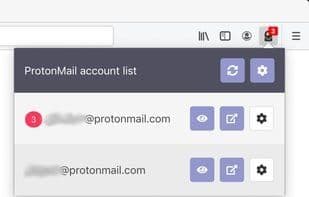
Unofficial ProtonMail Extension. Provides notifications and allows closing ProtonMail tabs, even the browser, without logging out.
General Settings:
• Fetch Interval: Choose how often the extension checks for new emails.
Settings:
• Persistent Session: Check this to keep the session in the browser's memory.
• Persist session even when the browser is closed: Check this to save it to disk. Warning: Your mailbox password will be written to your hard drive.
• Show unread count badge: A badge will appear on the extension icon, displaying the number of unread emails in the inbox.
• Show notifications for new emails: If checked, the extension will display notifications when new emails arrive.
• Enable Peek: If checked, you can view a list of unread emails in the inbox directly within the extension itself.
How to use Protonmail extension?
ProtonMail Extension is an unofficial ProtonMail browser extension that provides new email notifications and allows users to remain logged in even after closing the ProtonMail tab or browser.
Core Functions of Protonmail extension
Multi-account support, browser extension
Multi-Account Support
Browser Extension
Usage Scenarios of Protonmail extension
- Receive new email notifications for ProtonMail.
- Stay logged in after closing the ProtonMail tab or browser.
- Display the number of unread emails in the inbox on the extension icon.
- View a list of unread emails in the inbox within the extension.
Common Questions about Protonmail extension
What does ProtonMail Extension do?
How do I use ProtonMail Extension?
What are the core features of ProtonMail Extension?
What are the use cases for ProtonMail Extension?
















