




Product Information
What is Read aloud extension?
One-click to read the current webpage article aloud carefully. Supports over 40 languages.
Tired of sitting, tired of reading? With a single click, jump into bed and have articles read aloud to you. Choose from a variety of available male and female voices. You can also adjust the pitch and reading speed of the voice. Supports PDF.
Text-to-Speech (TTS) is an assistive technology that reads digital text aloud. Sometimes referred to as "read aloud" technology.
With the click of a button or a touch of your finger, TTS can take words on a computer or other digital device and convert them into audio. TTS is incredibly helpful for children who struggle with reading. But it can also assist with writing, editing, and even improving focus.
How Text-to-Speech Works
TTS is available on nearly all personal digital devices, including computers, smartphones, and tablets. It can read aloud various text files, including Word and Pages documents. Even online webpages can be read aloud.
The voices in TTS are computer-generated, and the reading speed can usually be adjusted to be faster or slower. Voice quality varies, but some voices sound remarkably human-like. There are even computer-generated voices that mimic a child’s speech.
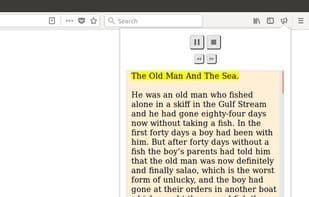
Many TTS tools highlight words as they are read aloud. This allows children to see the text while simultaneously hearing it.
How to use Read aloud extension?
Read Aloud Extension is a browser extension that reads web article content aloud with one click, supports over 40 languages, and offers various voice, speed, and pitch settings. As a text-to-speech (TTS) assistive technology, it aims to free users from screen reading, enhancing efficiency and focus.
Core Functions of Read aloud extension
Lightweight
Text-to-Speech
Browser Extension
Microsoft Edge extension
Text-to-speech
Reading
Usage Scenarios of Read aloud extension
- When tired, users can have web articles read aloud with one click, freeing their eyes
- Help children with reading difficulties listen to digital text content
- Assist children in writing, editing, and improving focus
- Listen to web articles via headphones while traveling or multitasking
Common Questions about Read aloud extension
What does the Read Aloud Extension do?
How do I use the Read Aloud Extension?
What are the core features of the Read Aloud Extension?
What are the application scenarios of the Read Aloud Extension?
















