




Product Information
What is Remove/crop-to selection?
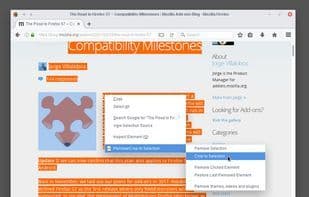
Remove or crop selections from the context menu, allowing you to print or save only the desired parts. Additionally, you can delete clicked elements and also remove ads, videos, or other third-party content from web pages.
How to use Remove/crop-to selection?
This Firefox extension allows users to remove or crop selected content from web pages to print or save only needed parts, removing clicked elements, ads, videos, and third-party content to help users focus on core information.
Core Functions of Remove/crop-to selection
Lightweight, extensible via plugins/extensions
Usage Scenarios of Remove/crop-to selection
- Print or save specific parts of a webpage.
- Remove selected text or images from a webpage.
- Crop a webpage to keep only the selected area.
- Remove specific elements from a webpage, such as images, paragraphs, or headings.
- Remove third-party content like ads, videos, or plugins from webpages.
Common Questions about Remove/crop-to selection
What does Remove/Crop-to Selection do?
How do I use Remove/Crop-to Selection?
What are the core features of Remove/Crop-to Selection?
What are the use cases for Remove/Crop-to Selection?
















