




Product Information
What is Sitelauncher?
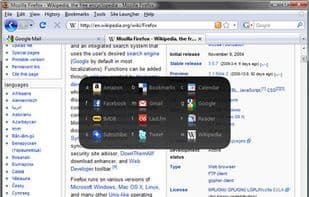
SiteLauncher is a lightweight Chrome and Firefox add-on that offers a super-fast way to navigate between your favorite websites.
A keyboard hotkey opens the "Launcher" panel, then pressing a single key jumps you to the website you want to open. The launcher can also be navigated using the mouse.
The default hotkey for the launcher is Ctrl+Space (which can be changed if needed).
How to use Sitelauncher?
SiteLauncher is a lightweight Chrome and Firefox browser extension offering a super-fast way to navigate between users' favorite websites.
Core Functions of Sitelauncher
Speed Dial
Bookmark
Browser Extension
Keyboard Shortcuts
Usage Scenarios of Sitelauncher
- Quickly access bookmarked websites
- Use keyboard shortcuts to open the Launcher panel and jump to target sites
- Enable fast navigation between sites in Chrome or Firefox
Common Questions about Sitelauncher
What does SiteLauncher do?
How do I use SiteLauncher?
What are the core features of SiteLauncher?
What are the use cases for SiteLauncher?
















