




Product Information
What is Stutter?
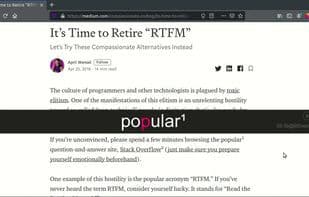
With this open-source Rapid Serial Visual Presentation (RSVP) extension and its two reading modes, read web content faster and more easily:
Select text on any page, even offline and local content, right-click, and stutter it.
To read full page content, click the extension icon to parse the page into stutter.
Click the stuttered text to pause/resume. Adjust the speed in settings by clicking the gear icon.
Keep your eyes focused on the red letters and let the words flash by. You'll read faster than ever before!
Watch the demo video: https://www.youtube.com/watch?v=tkgzaoqctzo
You can start stuttering in three ways:
- Click the icon in your browser to stutter the full page.
- Press Alt+R to trigger the stutter hotkey.
- Select the text you want to stutter, right-click, and choose "Stutter Selection."
While stuttering is running, use these hotkeys to control it:
- Alt+R: Restart stutter on the entire page
- Alt+P: Pause/Resume
- Alt+Left: Skip backward
- Alt+Right: Skip forward
- Alt+Up: Increase WPM by 50
- Alt+Down: Decrease WPM by 50
- ESC: Close stutter
Reposition the stutter interface on the screen by dragging the handle on the left. Stutter remembers its position for future use.
Many additional timing options and themes are available in the settings panel. Click the gear icon on the left while stutter is running to adjust these settings. Note: You must allow storage permissions to change these defaults.
Privacy Policy:
No data is collected. This add-on works in offline mode or with local content.
How to use Stutter?
Stutter is an open-source Rapid Serial Visual Presentation (RSVP) browser extension designed to help users read web content faster and more easily, improving reading efficiency.
Core Functions of Stutter
Please reply
Browser Extension
Readability
Usage Scenarios of Stutter
- Select text on any webpage for quick reading, including offline and local content.
- Parse and read entire webpage content with one click.
- Control reading progress with hotkeys (pause/resume, fast-forward/rewind, adjust speed).
- Adjust the position and theme settings of the reading interface on the screen.
Common Questions about Stutter
What does Stutter do?
How do I use Stutter?
What are the core features of Stutter?
What are the application scenarios of Stutter?




















