




Product Information
What is Tabsets tab manager?
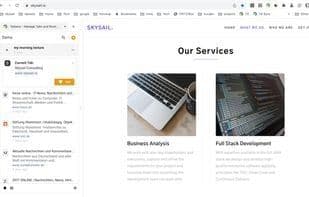
Bookmark the Next Generation - TabSets is a browser extension that helps you truly get organized.
With the TabSets extension, you'll have a new way to organize your links—a sort of "next-generation bookmarking"!
Here’s what you can do:
- Organize your links (URLs, bookmarks, tabs) in the browser’s sidebar
- Manage browser windows: Name open tabs within windows
- Find websites again (by URL, title, or even content)
- Quick access to your bookmarks (optional feature*)
- Easily locate and open a URL, or open all tabs in a collection
- Track new tabs and assign them to existing sets
- Drag-and-drop support
- Import and export as JSON
- Archive-style list sets (for later use) (optional feature*)
- Use color tags for organization (optional feature*)
- Utilize Chrome tab groups (optional experimental feature*)
- Monitor changes in tabs (optional experimental feature*)
- Share tabs (optional experimental feature*)
- And much more...
*) Optional features need to be activated on the settings page.
Data about your tabs and collections is stored locally in your browser’s cache, so it isn’t sent to any cloud service.
How to use Tabsets tab manager?
Tabsets is a browser extension designed to help users professionally manage and organize links, bookmarks, and browser tabs, offering next-gen bookmark management.
Core Functions of Tabsets tab manager
Privacy-Focused
Ad-Free
No Tracking
Tab manager
Browser extension
Usage Scenarios of Tabsets tab manager
- Organize links, URLs, bookmarks, and tabs in the browser sidebar.
- Manage browser windows by opening tabs in named windows.
- Easily retrieve websites by URL, title, or content.
- Quickly access and open bookmarks or tab groups.
- Track new tabs and assign them to existing tab sets.
- Archive tab sets for future use.
Common Questions about Tabsets tab manager
What does Tabsets do?
How do I use Tabsets?
What are the core features of Tabsets?
What are the use cases for Tabsets?
















