



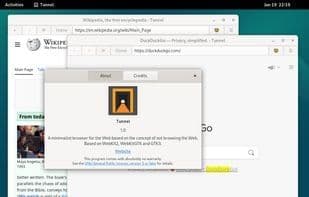

Product Information
What is Tunnel browser?
Tunnel is a simple, minimalist web browser based on the principle that even if you don't frequently use the internet, using Tunnel might not be a great idea. It serves as one of the primary browsers for downloading other browsers, continuing the ineffective and persistently useless legacy of several of its predecessors. Essentially, it's pretty bad.
**Features**
- **Lightweight**: Half the size (not counting dependencies) and half the memory usage of Firefox.
- **Threaded**: Web pages load in separate threads.
- **Ad Blocking**: Uses EasyList (DOM Elements) and Stevenblack Unified to block ads.
- **Quick Launch**: Due to its lack of features, Tunnel opens relatively faster compared to heavyweights like Firefox or Chromium.
- **Minimalist**: The interface is small, understandable, and doesn’t take up the entire top half of the screen.
- **"Profiles"**: Customizable storage locations for cookies and browsing history.
- **Incognito**: Can also be enabled at startup.
- **Downloads**: Capable of downloading files, though it doesn’t remember what it downloaded once completed.
- **Search**: It does that.
- **Cross-Platform**: Runs on Linux. If you install the dependencies, it can also run on Windows and macOS. Possibly BSD too.
- **Not a Chromium Wrapper**: Uses WebKit, which is good because it’s not Blink.
*Very rough calculations. Don’t trust them.*
**Anti-Features**
- **Security**: Questionable. It stores cookies and browsing history in plain text (to be fair, Firefox also stores cookies unencrypted), but it doesn’t store passwords (you should use a password manager), so if your PC is compromised, those passwords remain inaccessible.
- **Tabs**: Non-existent. You can open multiple windows—just as God intended.
- **Passwords**: Not managed. Use an actual password manager. But at least you don’t have to log in every time you open the browser, thanks to cookies.
- **Bookmarks**: Not managed. For heaven’s sake, use a text file.
How to use Tunnel browser?
Tunnel Browser is a minimalist, resource-light web browser focused on providing a fast-starting, low-resource, and clean interface, primarily for downloading other browsers.
Core Functions of Tunnel browser
Lightweight
Minimalist
Ad-Free
Webkit engine-based
Built-in Ad Blocker
Usage Scenarios of Tunnel browser
- Download other browsers
- Perform web searches.
- Download files
- Enable incognito mode browsing
- Block web advertisements
Common Questions about Tunnel browser
What does Tunnel Browser do?
How do I use Tunnel Browser?
What are the core features of Tunnel Browser?
What are the use cases for Tunnel Browser?
















