




Product Information
What is Typio form recovery?
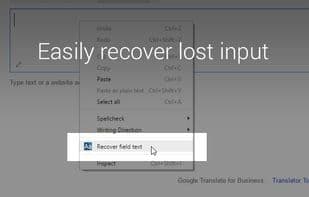
Never lose your form inputs again! Typio automatically saves text as you type and allows you to recover it anytime. With Typio Form Recovery, your data is saved automatically, making it easy to restore lost entries. You have full control over which sites have auto-save enabled and how long inputs are stored. Typio is lightweight and secure—your data never leaves your computer.
How to use Typio form recovery?
Typio Form Recovery automatically saves user-entered text, helping users easily recover form content in case of data loss, avoiding repetitive input.
Core Functions of Typio form recovery
Form Field History
Disaster recovery
Auto-save
Web Forms
Browser extension
Browser Extension
Web Forms
Usage Scenarios of Typio form recovery
- Browser crashes causing loss of input content
- Accidentally closing or leaving a page, resulting in unsaved form data
- Avoid re-entering data when filling out forum posts or email forms due to unexpected incidents
Common Questions about Typio form recovery
What does Typio Form Recovery do?
How do I use Typio Form Recovery?
What are the core features of Typio Form Recovery?
What are the use cases for Typio Form Recovery?
















