




Product Information
What is Unhook?
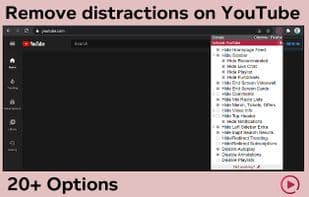
Hide YouTube-related videos, comments, video suggestion walls, homepage recommendations, trending tabs, and other distractions.
A browser extension that removes YouTube distractions, including recommended sidebars, end-screen video suggestions, user comments, homepage-related video feeds, trending tabs, turns off autoplay or annotations, and more. Toggle options via a popup to customize your YouTube experience!
Compatible with mobile YouTube via Kiwi Browser or Yandex Browser on Android, as well as m.youtube.com. Also works on embedded videos.
Options
Hide Home Feed
Hide the "Home" tab and redirect to subscriptions
Hide Sidebar
Hide recommendations, i.e., related videos
Hide live chat
Hide playlists
Hide End Screen Videos
Hide End Screen Cards
Hide Comments
Hide Commenters' Profile Pictures
Hide Mixed Radio Playlists
Hide Merchandise, Tickets, Offers
Hide Video Info
Hide Video Button Bar (Like/Dislike)
Hide Channel (Profile + Subscribe Button)
Hide Video Description
Hide Top Header
Hide Notification Button + Header Count
Hide Left Sidebar Extras (Subscription List, "More from YouTube")
Hide Channels
Hide YouTube's Best
Hide More from YouTube
Hide Irrelevant Search Results ("Related to your search," "Latest," "Related to," "People also searched for," etc.)
Hide and Redirect Trending
Hide and Redirect Subscriptions
Disable Autoplay
Disable Annotations
Disable and Redirect Playlists
How to use Unhook?
No usage instructions available, please contact customer service for details
Core Functions of Unhook
Distraction-free
Distraction-Free
YouTube Integration
Microsoft Edge extension
Usage Scenarios of Unhook
No usage scenarios available, please contact customer service for details
Common Questions about Unhook
No common questions available, please contact customer service for details
















