




Product Information
What is Unsmartifier?
Unsmartifier is a Safari web extension that removes annoying smart app banners urging you to download an app for the current webpage.
Just enable Unsmartifier—it runs quietly in the background, preventing future smart banners.
Usage:
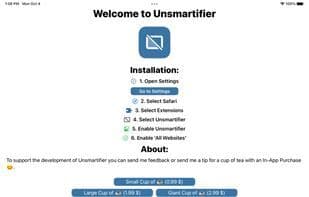
Open Settings
Select Safari
Select Extensions
Choose 'Unsmartifier'
Enable 'Unsmartifier'
Enable 'All Websites'
Permissions info: Unsmartifier needs to run on all websites to preempt banners not yet displayed. It does nothing else.
Note: It can't remove app clip banners linked to website apps. To remove those, delete the corresponding app. It also focuses on system smart banners—custom ones can be blocked with content blockers.
How to use Unsmartifier?
Unsmartifier is a Safari extension that removes annoying smart app banners in iOS Safari, which typically prompt users to download the app version of the current webpage. Its core value is blocking these banners for a cleaner browsing experience.
Core Functions of Unsmartifier
Safari extension
Usage Scenarios of Unsmartifier
- Block smart app banners from appearing when browsing on iOS Safari
- Automatically prevent smart app banners from displaying on new websites
- Provide a cleaner mobile web browsing experience without forced app downloads
Common Questions about Unsmartifier
What does Unsmartifier do?
How do I use Unsmartifier?
What are the core features of Unsmartifier?
What are the use cases for Unsmartifier?
















