




Product Information
What is Url monitor?
Have you ever wanted to keep URLs on the web or in your bookmarks/favorites folder? You could use a notepad, paste URLs everywhere. Then later, open this note and paste it into your browser, risking broken links. Have you ever needed to verify a large list of URLs, but found opening them in all browser tabs or one by one to be a tedious process?
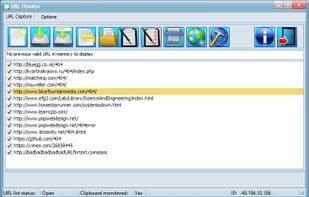
This is where URL Monitor comes to the rescue. It's a software that monitors the clipboard for URLs. Each time a URL is detected, it's automatically added to the URL list. This list can be reloaded upon the next launch of the software.
Moreover, URL Monitor allows you to:
- Validate URLs in bulk or individually from the list, so if a URL link is broken, you can easily remove it from the list using the validation tools provided in URL Monitor.
- Manage the list from within the software, launching URLs with your default browser...
- Export the URL list to HTML (URL Monitor's default format), text files, or any specific file type you require. For instance, HTML export is useful for Mozilla Firefox to import all these lists into a bookmarks folder.
- Import lists, HTML and HTM files (without parsing), text files, or any files that contain a list of URLs. This can be done via the open button or by dragging and dropping files into the URL list for link control purposes.
And there's more...
Indeed, URL Monitor serves as a bookmark manager outside any browser. That's what makes this application useful. It's icon/button-driven, but the hint panel is always there to assist you.
How to use Url monitor?
URL Monitor is a Windows desktop app that captures URLs from the clipboard and adds them to a list. It serves as a browser-independent bookmark manager, helping users validate, manage, import, and export URL lists efficiently.
Core Functions of Url monitor
Clipboard Monitoring
Usage Scenarios of Url monitor
- Save URLs Found Online or in Documents Beyond Browser Bookmarks/Favorites
- Bulk Validate Large Numbers of URLs to Identify and Remove Broken Links
- Manage URL Lists, Such as Launching a URL in the Default Browser
- Export URL Lists to HTML, Text Files, etc., for Easy Import into Other Applications (e.g., Firefox Bookmarks)
- Import URL Lists from HTML, Text Files, etc.
- Use the Integrated Browser to Capture All Links on a Web Page
Common Questions about Url monitor
What does URL Monitor do?
How do I use URL Monitor?
What are the core features of URL Monitor?
What are the application scenarios for URL Monitor?
















