




Product Information
What is Wblock?
wBlock is a powerful content blocker for macOS that reduces noise by blocking it, offering a clean and private browsing experience without the hassle. Utilizing Adguard's filters and more, wBlock gives you the best of both worlds: high performance and maximum blocking.
Lightning Fast: Optimized for performance (around 40 MB RAM when idle)
Comprehensive Protection: Blocks ads, trackers, and malware
Always Up-to-Date: One-click filter list updates (Auto-Updater coming soon!)
Adguard Filters: Uses the latest and greatest along with other third-party filter lists
Features
Injects scripts to block YouTube ads and more
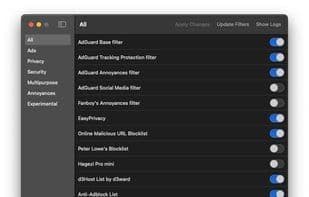
Intuitive category-based filter management
Toggle individual filter lists on/off
Automatic updates for the app and filter lists
Detailed logs for troubleshooting
Missing filter detection and easy installation
How to use Wblock?
wBlock is a content blocker for macOS, designed to provide Safari with a clean, private browsing experience by blocking ads, trackers, and malware, ensuring high performance and maximum content blocking.
Core Functions of Wblock
Privacy-focused, no registration, block trackers, no ads, no tracking, auto-updates
Usage Scenarios of Wblock
- Enjoy Ad-Free, Tracker-Free Private Browsing on Safari.
- Block Ads in YouTube Videos.
- Keep Filter Lists Up-to-Date with One-Click Updates.
- Manage and Switch Between Different Categories of Filter Lists.
- View Detailed Logs for Troubleshooting.
Common Questions about Wblock
What does wBlock do?
How do I use wBlock?
What are the core features of wBlock?
What are the application scenarios of wBlock?
















