




Product Information
What is Page-to-design?
Elegant design web components for importing entire pages and assets from any webpage into Figma or references, without starting from scratch.
How to use Page-to-design?
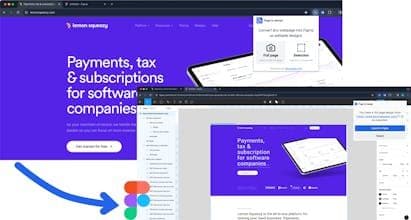
Page-to-design is a browser extension that imports the complete design, components, and assets of any webpage into Figma as editable design drafts, helping designers kickstart projects or gather references quickly.
Core Functions of Page-to-design
Convert any webpage into Figma-editable designs
Pixel-perfect capture of webpage design elements
One-click quick capture of full-page designs or specific components
Localized processing for all conversions, ensuring data privacy and conversion speed
Usage Scenarios of Page-to-design
- Quickly start design projects without starting from scratch
- Redesign using existing web designs as references
- Extract and reuse components, images, and icons from web pages
- Improve design efficiency and save time
Common Questions about Page-to-design
What does Page-to-design do?
How do I use Page-to-design?
What are the core features of Page-to-design?
What are the use cases for Page-to-design?
















