




Product Information
What is Xscope browser?
xScope Browser is a fast way to browse the web and files.
[An early paid version of xScope Browser (version 6.5) is available for free at https://plus.google.com/118418418683722370457392/posts/kxrg1racmgh.
Features
Clean, minimal overhead = optimal performance.
Instant back/forward navigation.
True tabs,
Many settings/options,
Import Google bookmarks,
Import desktop bookmarks (via HTML file),
And screenshot functionality.
Plus seamlessly integrated file explorer:
Browse, open, email, and share your files,
Text copy/selection,
3 zoom methods (multi-touch, pinch-to-zoom, and tapping),
Theme support,
Download most videos (MP4), audio (MP3), and documents (PDF & Doc),
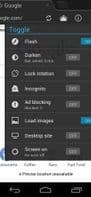
And support for Flash content (Froyo and above).
How to use Xscope browser?
xScope Browser is a fast web and local file browser designed for optimal performance and seamless file exploration.
Core Functions of Xscope browser
Multi-touch support
Tabbed Browsing
Built-In File Manager
Built-in screen recording
Tabbed Browsing
Built-in screenshot capture
Usage Scenarios of Xscope browser
- Browse the web quickly
- Browse, open, send emails, and compress local files
- Import Google and desktop bookmarks
- Take screenshots
- Download videos, audio, and documents
- Play Flash content
Common Questions about Xscope browser
What does xScope Browser do?
How do I use xScope Browser?
What are the core features of xScope Browser?
What are the application scenarios for xScope Browser?
















