
Product Information
What is Commit-photos?
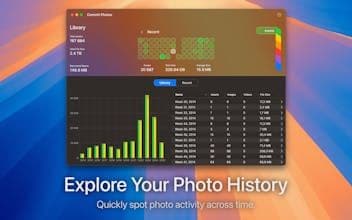
Commit Photos transforms your photo collection into a visual contribution chart, helping you understand storage usage at a glance. Organize your library, reclaim space, and bid farewell to duplicates and forgotten videos.
How to use Commit-photos?
Commit Photos converts photo collections into visual contribution maps, helping users understand storage usage at a glance. It helps organize photo libraries, reclaim storage space, and remove duplicates and forgotten videos/screenshots.
Core Functions of Commit-photos
Visual Contribution Map: View Photo Activity by Day/Week/Month
Smart Filtering: Quickly Find Photos, Videos, and Large Files
Detailed Statistics: Track Storage Usage and Media Types
Review Mode: Safely Select and Confirm Deletion
iCloud Support: Seamless Integration with iCloud Photo Library
Usage Scenarios of Commit-photos
- Clean up iCloud photo library.
- Understand photo storage usage.
- Organize personal photo libraries.
- Reclaim storage space.
- Delete duplicate photos and forgotten videos/screenshots.
- Filter, review, and remove unwanted photos and videos.
Common Questions about Commit-photos
What does Commit Photos do?
How do I use Commit Photos?
What are the core features of Commit Photos?
What are the use cases for Commit Photos?